Air Hockey Split-Screen Duel
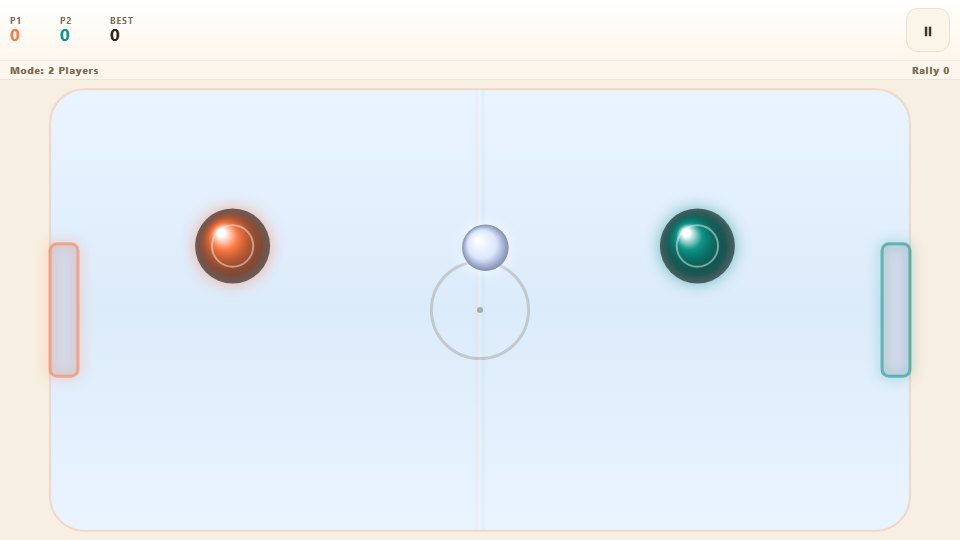
Two mallets, one rink, one phone. Each player drags their own half of the screen and slams a puck past the rival goal, and the first to seven goals takes the match.
Keyboard works too Everything runs inside your browser. Nothing is installed on your phone.
Controls
Tap Play and pick two-player or one-player versus CPU.
How to play
- Tap Play and pick two-player or one-player versus CPU.
- Player one drags the left half of the screen to move their mallet.
- Player two drags the right half to guard their own goal.
- Angle your shots with the edge of the mallet and use the walls.
- The first player to seven goals wins the match.
- Take a break anytime, since the game pauses when you leave the tab.
About this game
The mallet slides across a glossy rink, the puck ricochets off a wall, and for a second nobody is sure who is going to reach it first. Air hockey has always been a game of angles and nerve, and this version puts the whole table onto a single phone without losing the feel of the real thing.
It is built for two. Player one takes the left goal and player two the right, each guarding their own half of the rink. Because a mallet is confined to one side, there is no crowding, just two people reading a fast puck and trying to out-think each other.
What you actually do
Drag anywhere on the left half of the screen to steer player one’s mallet, and the right half for player two. On a keyboard, WASD moves the left mallet while the arrow keys move the right. Pucks bounce off the rink walls, a central barrier divides the table, and only shots into the goal mouth count.
The puck picks up speed with every clean hit and there is a hard limit on how fast it can travel, so a well-angled shot near the edge is often slower but far harder to stop. The first player to seven goals takes the match. If you are playing alone, a one-player mode swaps player two for a computer mallet that mirrors your position and presses forward whenever the puck is on its side of the table.
Tips that make you better
- Strike the puck with the side of the mallet to send it in at an angle rather than straight back.
- Keep your mallet between the puck and your goal, and never leave the mouth open.
- Use the side walls, since a puck that ricochets off a wall is far harder to read than a direct shot.
- Do not over-hit. A gentle, angled touch can be harder to return than a wild swing.
- In two-player mode, watch your rival’s hand to predict which side they are covering.
Who it is for
Two people with a spare five minutes and one phone. It suits a family table or a pair of friends waiting out a school-holiday rainstorm, and it is simple enough that anyone can join without reading a manual. The short matches also make it easy to swap partners and keep everyone involved.
It also works well as a warm-up before a more demanding game.
Playing it on a phone
Each player drags their own half of the touchscreen, so a shared handset works naturally. The game needs no download and runs smoothly on a mid-range Android, and it pauses when you switch away, so an interruption never ruins a tight match.
With quick points and instant restarts, a full match rarely stretches beyond a few busy minutes.
Frequently asked questions
Can both players use the same phone?
Yes. The rink is split in two, with player one dragging the left half and player two the right, so each person controls their own mallet on one device.
How does the puck bounce?
It rebounds off the rink walls and a central barrier. Angled shots near the walls are slower than direct strikes but much harder to defend.
Can I play solo?
You can choose a one-player mode where a computer mallet mirrors your position and pushes forward whenever the puck is on its side.
What decides the winner?
The first player to score seven goals wins. A short pause resets the puck to the centre after each goal.