Tic Tac Toe: Beat the Computer
Take on the computer in the classic three-in-a-row duel, and you always move first. Pick Easy, Medium or Hard and set out to build a winning streak.
Keyboard works too Everything runs inside your browser. Nothing is installed on your phone.
Controls
Choose Easy, Medium or Hard, then tap Play to start a round.
How to play
- Choose Easy, Medium or Hard, then tap Play to start a round.
- Tap an empty cell, or press keys 1 to 9, to place your X.
- The computer answers as O, then it is your turn again.
- Line up three of your marks to win the round.
- Tap Next round to keep playing and extend your winning streak.
About this game
Tic Tac Toe is the game everyone already knows, polished for a quick round against the computer. You play as X and always get the first move, which is a small but helpful head start against the opponent. It is the sort of game you can finish in under a minute, then immediately want to play just one more time.
Three difficulty settings change the challenge completely, from a relaxed opponent that makes mistakes to one that simply cannot be beaten. Most players start on Easy and slowly work their way up as the winning patterns start to feel natural and familiar.
What you actually do
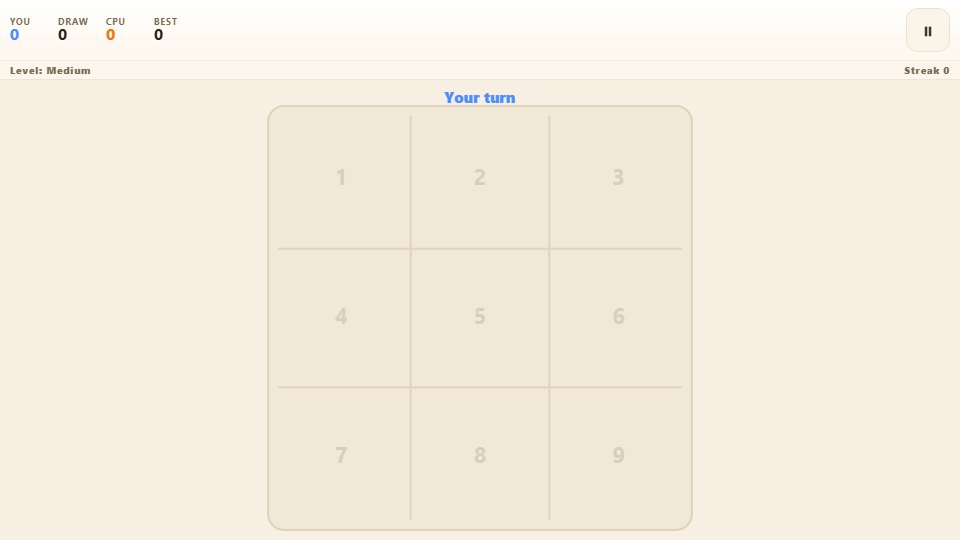
Tap any empty cell to place your X, or use the number keys one to nine, and the computer replies as O. The aim is the familiar one: line up three of your marks in a row, a column or a diagonal before the other side does. A gold line sweeps across your winning three, and the round ends with a clean result panel that shows your updated totals.
Pick Easy for a computer that sometimes overlooks a win, Medium for one that blocks and hunts the centre, or Hard for a perfect opponent that never slips up. Wins, draws and losses are tallied along the top, and your best unbeaten streak is remembered on your device. Empty cells show faint number hints, which come in handy if you prefer to play with the keyboard instead of tapping.
Tips that make you better
- Start in a corner rather than the centre against weaker opponents, since it opens more winning lines for you.
- Always look for a line where you already have two marks and can complete it on your next turn.
- Block the computer the moment it has two in a row, rather than building your own attack first.
- Create a fork by setting up two threats at once, because even a strong opponent can only block one.
- On Hard, play for a draw instead of a win, since a perfect opponent will never let you take three in a row.
Who it is for
It suits anyone who wants a fast, familiar game with a genuine challenge at the higher difficulty, and it is a natural fit for a short break. Getting a single draw out of the Hard setting already feels like a real achievement worth celebrating.
Playing it on a phone
The board scales to the screen and the tap targets are generous, so it is easy to place a mark accurately on a mid-range phone. Unplayed cells show faint number hints for keyboard players, and the game pauses itself when you look away, so your winning streak is safe while you deal with real life.
Frequently asked questions
Do I always move first?
Yes. You play as X and take the opening move in every round, which gives you a small advantage over the computer playing as O.
What is the difference between the difficulties?
Easy makes occasional mistakes and may miss a win. Medium blocks most threats and fights for the centre. Hard plays perfectly and will not lose.
What does the streak counter track?
It counts how many rounds you have won in a row without a loss or a draw. Your longest streak is saved on your device as a personal best.
Can I use the keyboard instead of tapping?
Yes. Number keys one to nine place a mark in the matching cell, and on the menu the same keys select your difficulty.