Connect Four: Line Up Four
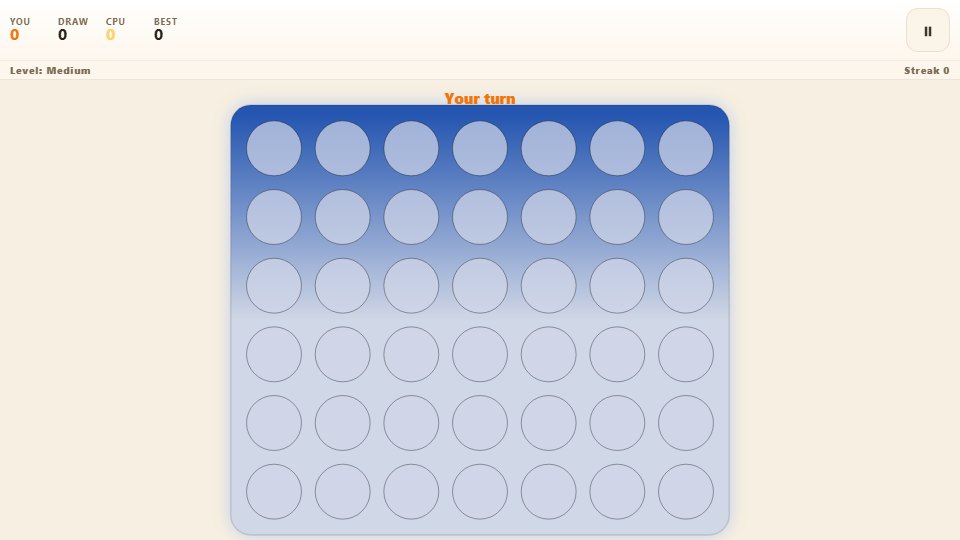
Drop discs into a seven-column grid and race the computer to line up four in a row. You go first in every round, so build the first threat before it replies.
Keyboard works too Everything runs inside your browser. Nothing is installed on your phone.
Controls
Choose Easy, Medium or Hard, then tap Play to begin.
How to play
- Choose Easy, Medium or Hard, then tap Play to begin.
- Tap a column, or use the arrow keys and Space, to drop a disc.
- Take turns with the computer, which always replies after you.
- Line up four of your discs in a row, column or diagonal to win.
- Tap Next round to play on and extend your winning streak.
About this game
Connect Four is the gravity puzzle where every disc you drop falls to the lowest open space in its column. Seven columns sit above six rows, and you and the computer take turns trying to line up four of your colour. It looks like a children’s game and plays like a genuine battle of wits.
You always drop first, playing red against the computer’s gold, which gives you the honour of setting the very first threat of the round. From there, the pair of you trade attacks and blocks until someone finally finds an opening and pounces.
What you actually do
Tap a column, or nudge the selector with the arrow keys and press Space, or simply press the number keys one to seven, to drop a disc. The disc slides down, and the aim is to join four of your discs in a row, a column or a diagonal before the other side does. A short warning flashes if you aim at a full column, so a mistimed tap never wastes your turn.
Choose Easy for a loose opponent, Medium for one that wins and blocks when it can, or Hard for a searching opponent that looks several moves ahead. Wins, draws and losses are tallied, your best streak is saved, and the board glows briefly around the winning four whenever a round is decided. The gold-and-red colour scheme makes it easy to see whose discs are whose at a glance.
Tips that make you better
- Play the centre column early, since a disc there sits on more potential fours than anywhere else on the board.
- Build threats on top of each other, because a single disc can contribute to a row, a column and both diagonals.
- Before you attack, check whether the square you need is one the computer can simply block in time.
- Set up two winning squares at once, since even a strong opponent can only close one of them.
- Watch for the computer’s diagonal threats, which are the easiest to overlook and easily the most dangerous.
Who it is for
It is made for players who enjoy a slower, more thoughtful game than a reflex test, and it is satisfying to chip away at the harder difficulties round after round. Patient players who like planning two moves ahead will get the very most out of it.
Playing it on a phone
Columns are spaced wide enough for an accurate tap, and a selector arrow shows where your disc will land. The discs animate smoothly on a mid-range Android, and a column-full warning flashes rather than punishing a mistimed tap. The game pauses itself when you switch away, so a long, careful round is never lost.
Frequently asked questions
Who moves first?
You do. You play the red discs and always drop first, while the computer follows with gold discs. Starting first lets you set the opening threat of every round.
How do the difficulties differ?
Easy plays loosely and misses chances. Medium takes a win or blocks yours whenever it can. Hard looks several moves ahead and is very tough to beat.
What if I pick a full column?
Nothing is wasted. The column flashes a short warning and you simply choose another one, keeping your turn intact.
Is my streak saved?
Yes. Your longest run of wins is stored on your own device, alongside your overall wins, draws and losses.